Good sources. New ideas.

Your research. One AI knowledge library.

Save webpages, PDFs, videos, and notes. Search the originals, connect related ideas, or ask AI and follow the sources.

Start free · No card required

Read the source beside an answer with citations.
KeepFlash showing an English research article beside an AI answer with numbered citations and two related source notes

58-second product tour

Turn saved research into a clear decision.

Follow an onboarding question through three saved sources, the original PDF, and a decision for the next release.

Gather sources · check the original · save your decision00:58

01 / Save first. Sort later.

Webpages, PDFs, and videos. All within reach.

Clip the page you are reading, upload a file, or write a note. KeepFlash keeps the content and its source, ready when you need it.

  • Webpages

    Keep the article and its original link.

  • PDFs & files

    Bring in reports to read and annotate.

  • YouTube videos

    Save videos with available transcripts and chapters.

  • Notes

    Write ideas and connect them with backlinks.

KeepFlash Product Research Space with the Add note menu open: Note, Save from link, and Import file

02 / Find what you saved

Forget the title. Find the article.

A keyword or a rough idea is enough to start. Search your saved content and return to the article you had in mind.

Keyword search
Search the content you saved. Included in the free plan.
Semantic search
Describe what you are looking for and search by meaning. Included in Plus and Pro.
KeepFlash keyword search for context showing four saved research notes with matching passages and the username keepflash
Search saved content and scan the matching passages. Keyword search shown.

03 / Bring related ideas together

A topic takes shape. The sources stay close.

Auto Wiki brings related notes into readable Topic Pages. Review the sources, explore key ideas, and open a citation to see the original evidence.

AI tags
Reuse existing tags first, with fewer duplicate categories.
Auto Wiki
Build an overview from related notes, with the sources attached.
Explore personal knowledge management
KeepFlash Topic Wiki with a research overview and an original quotation open in the Source evidence panel

Stay with the material

Read. Mark it up. Make it yours.

Pick up where you left off, right beside the source.

Write your own notes in a block editor

Use headings, lists, quotes, and media. Connect your notes and references with backlinks.

Annotate PDFs and revisit video transcripts

Highlight a passage or use available transcripts and chapters to return to a moment in a video.

Ask about your notes. Get answers with citations.

Choose a note or Topic Page as the basis for a question, then read the answer alongside its sources.

04 / Agent Access · Included with every plan

Your agent. Your own research.

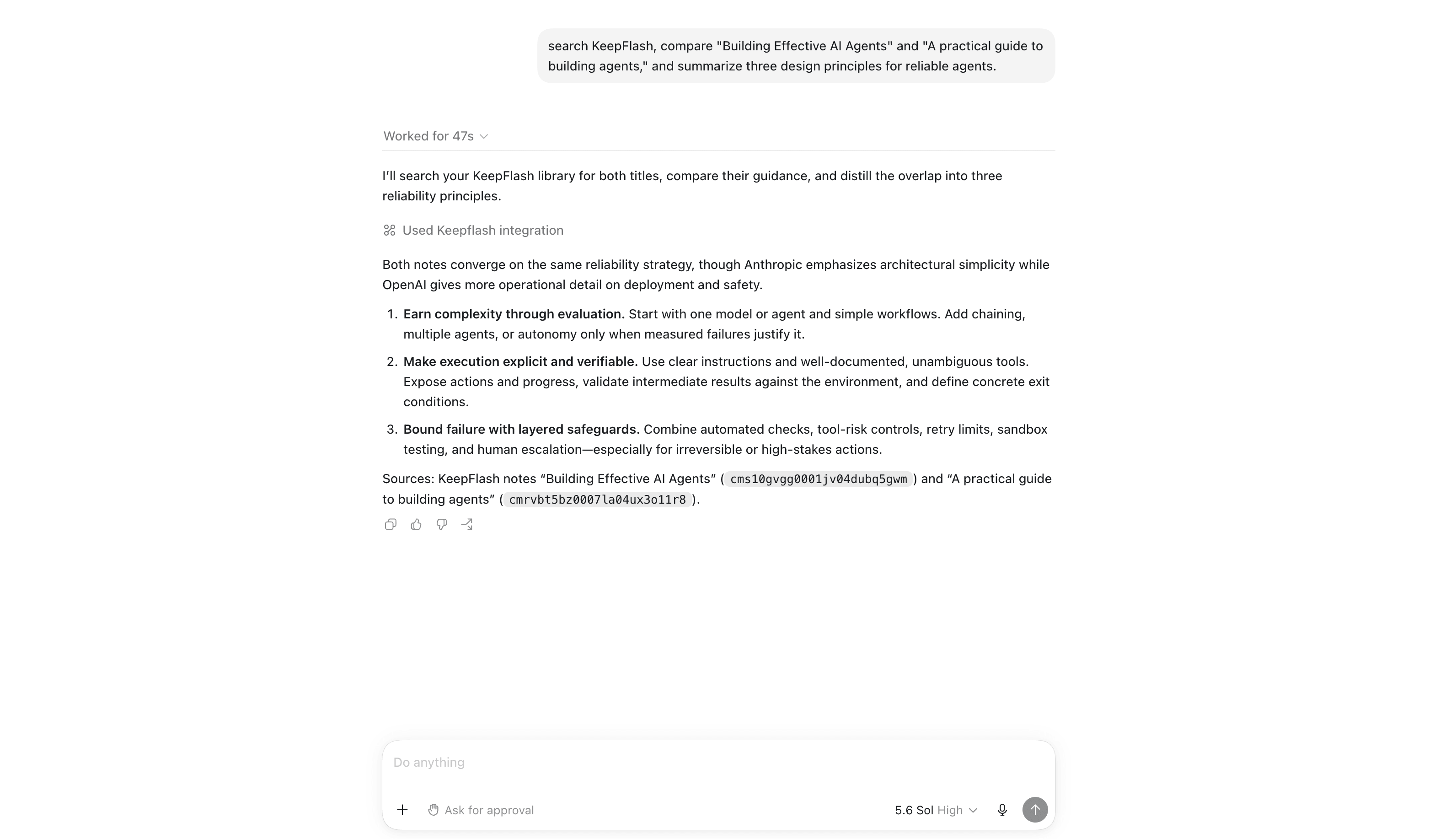
Connect Codex, Claude Code, or Cursor through MCP to search your library, read saved notes, and cite them in its answers.

  • Codex
  • Claude Code
  • Cursor

Read-only access · One token per agent · Revoke anytime

Start for free

Connect your agent from Settings after you sign up.

Codex using KeepFlash MCP to search a personal knowledge library and answer with citations to saved notes

Pricing

Start free. Make room as you grow.

Build your library first. Upgrade for more space, semantic search, or higher AI limits when you need them.

Save 20%

Free

$0
No card required

For building the habit: save your first webpages, PDFs, videos, and ideas in one library.

150 notes
2 spaces
500MB storage
10MB max file size
PDF annotations included
Save YouTube links as video notes
200 KeepFlash credits per month
Selected AI models
Unlimited AI auto tagging
Try Auto Wiki with a few Topic Pages
Most Popular

Plus

$6.58
Per month · billed yearly

For everyday research, writing, and study with faster retrieval and full AI context workflows.

Unlimited notes
10 spaces
10GB storage
50MB max file size
Faster hybrid and semantic search
1,000 KeepFlash credits per month
Unlock all AI models
Unlimited AI auto tagging and Auto Wiki for everyday use

Pro

$12.42
Per month · billed yearly

For long-running projects, larger libraries, heavier files, and higher AI usage.

Everything in Plus
Unlimited spaces
50GB storage
200MB max file size
5,000 KeepFlash credits per month
Priority support
Higher Auto Wiki limits
Priority background processing
Compare plans

Choose the plan that fits how you save, revisit, and build on what you collect.

FeatureFreePlusPro
Notes150UnlimitedUnlimited
Spaces210Unlimited
SearchKeyword searchHybrid / semanticHybrid / semantic
AI auto taggingUnlimitedUnlimitedUnlimited
Auto Wiki3 Topic Pages50 Topic Pages300 Topic Pages
Storage500MB10GB50GB
Max file size10MB50MB200MB
AI model accessSelected modelsAll modelsAll models
KeepFlash credits / month2001,0005,000
PDF annotationsIncludedIncludedIncluded
PDF exportNot includedIncludedIncluded
YouTube transcriptsIncludedIncludedIncluded
Browser extension captureIncludedIncludedIncluded
Agent Access via MCPIncludedIncludedIncluded
Background processingStandardStandardPriority

Common questions

How is KeepFlash different from browser bookmarks?

Browser bookmarks mainly store links. KeepFlash also captures supported webpage content and keeps PDFs, videos, and notes in one library, with content search, annotations, and AI answers linked to their sources.

Do Topic Pages keep the original sources?

Yes. Auto Wiki compiles related notes into a topic overview with links to the source material. You can return to those notes or use the Topic Page as the basis for an AI question.

What do KeepFlash credits cover?

KeepFlash credits cover AI features and supported public-content reads. AI usage varies by model and tokens; each new TikTok, X, or YouTube save uses the content-read cost shown before saving.

Which AI models are included in each plan?

Free includes selected AI models for lighter everyday use. Plus and Pro include all currently supported AI models.

What happens if I hit my storage limit?

You can keep your existing content, but you will need to upgrade or free up space before uploading more files.

Can I switch plans later?

Yes. You can upgrade whenever you need more space, smarter search, or higher AI limits.

Can I use KeepFlash with Codex, Claude Code, or Cursor?

Yes. Agent Access lets you create a separate read-only token for each agent and connect through MCP. The agent can search your library and read relevant notes; you can revoke its access at any time from Settings.

Start with your next save

Keep something worth coming back to.

Start with one article, one PDF, or one idea. Your library grows from there.

Start for free

No card required · browser extension included